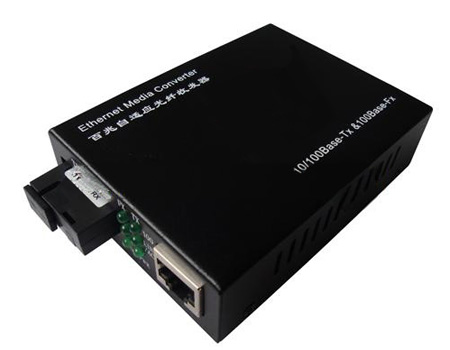
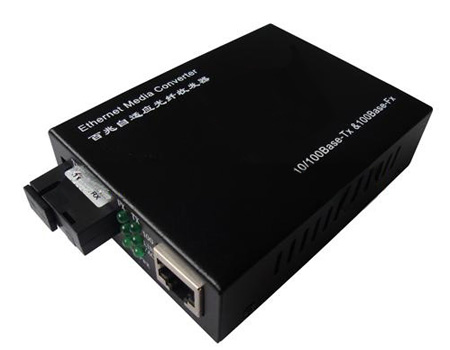
Many thanks for purchasing Fast Ethernet optical transceiver! This product supports
IEEE802.3UI100Base-Tx/Fx protocol, as well as full duplex and half duplex mode. This
manual is for adaptive 100M, 10M/100M transceivers. The following purchasing guide is
for customer's reference
| Model | Specifications | |
| 10100E-MCM-2 | 10/100M adaptive, multi mode 2km, | |
| 10100E-SCM-25 | 10/100M adaptive, single mode 25km,SC | yes |
| 10100E-SCM-40 | 10/100M adaptive, single mode 40km,SC | |
| 10100E-SCM-60 | 10/100M adaptive, single mode 60km,SC | |
| 10100E-SCM-100 | 10/100M adaptive, single mode 100km,SC |
1. In conformity to IEEE 802.3 10 Base-T standard.In conformity to IEEE 802.3u 100 Base-TX/FX standard.
2. Max. 2M buffer memory built in chip.
3. Back pressure flow control for full duplex IEEE802.3 X and half duplex.
4. Automatic identification of MDI/MDI-X cross line.
5. High-performance1.4Gbps memory bandwidth.
6. In conformity to safety code of FCC and 15 CLASS A and CE MARK.
1. Interface
RJ-45 interface
The transmission media adopts CAT5 twisted-pair with typical length of 100 meter. It features the function of automatically identifying the through line and cross wire (10/100M).
Fiber interface
SC/ST fiber interface is of duplex mode type, including two interfaces, namely TX and RX. When the two sets of optical transceiver are interfaced or connected to switch with fiber interface, the fiber is in cross connection, namely "TX-RX", "RX-TX" (direct butting for single optical fiber).
2. Connection
The network device (work station, hub or switch) with RJ-45 interface is connected to RJ-45 jack of optical transceiver through twisted-pair. And the multi/single mode fiber is connected to SC/ST fiber interface of the optical transceiver. Then switch on. The corresponding LED is on for correct connection.(See the table below for the LED indicator lamp).
LED indicator lamps serve as device monitoring and trouble display. The following is the explanation for each LED indicator lamp.
| LED indicator lamp | Status | Explanation |
| FX Link/Act | On | Connection status display for fiber link."ON" indicates that Fiber link is in correct connection |
| Blink | Active status display of fiber link "Blink" indicates packet goes through Fx end. | |
| TX Link/Act | On | Connection status display for electric link."ON" indicates that electric link is in correct connection. |
| Blink | Active status display of fiber link "Blink" indicates packet goes through Tx end. | |
| FDX | On | Transceiver works in the full duplex mode |
| Off | Transceiver works in the half duplex mode. | |
| PWR | On | Power is on and normal |
| FX | On | Transfer rate of optical interface is 100Mbps. |
| TX | On | Transfer rate of electric interface is 100Mbps. |
| Off | Rate of electric interface is 10Mbps |
| Product model | Optical wavelength (nm) | Transmitting optical power | Receiving sensitivity | Transmission distance (km) |
| 10100E-SM (25km) | 1310/1550 1550/1310 | -12-6 | -12 | 25 |
| 10100E-CSM (40km) | 1310/1550 1550/1330 | -3-5 | <-31 | 40 |
| 10100E-CSM (60km) | 1310/1550 1550/1330 | -5-9 | <-44 | 60 |

 English
 中文版
 français
 русский
 Español
 عربى